
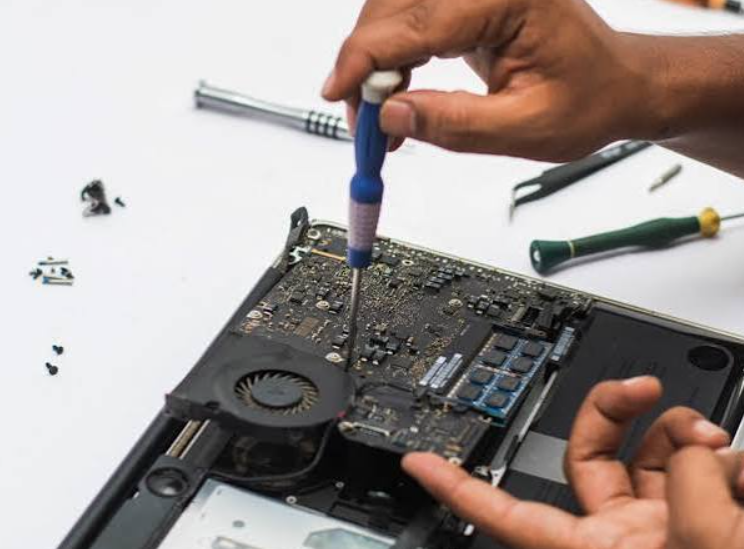
Is your laptop or Mac screen flickering? It can happen because of a damaged screen, loose cable, software problem, or failing hardware. As the Best Laptop & Mac Computer Repair Shop, we first check what is causing the problem before starting any repair. We test both the hardware and software so we can find the real issue. With over 10 years of experience, we have repaired thousands of laptops, Macs, and mobile devices. At Cracked My Phone, we focus on honest repairs, quality parts, and fast service to help customers get their devices working again. If you are looking for Cell Phone and Computer Repair shop nearby, our experienced team is ready to help.
What Causes a Screen to Flicker?
A flickering screen is more common than many people think.
Sometimes the problem is small.
Sometimes it is a sign of a larger issue.
The good news is that many screen problems can be repaired without replacing the whole computer.
Over the years, we have seen many different causes.
The most common ones include:
A damaged screen
A loose display cable
Outdated software
Graphics driver problems
Water damage
A failing graphics chip
Battery or power issues
Many customers think they need a new laptop.
In reality, many of these problems can be repaired at a much lower cost.
That is why we always perform a full inspection before suggesting any repair.
Why Should You Not Ignore Screen Flickering?
A screen that flickers once in a while may not seem serious.
Many people continue using their device and hope the problem goes away.
Unfortunately, this rarely happens.
A small problem can become much worse over time.
For example, a loose display cable may slowly become more damaged each time the laptop is opened and closed.
A graphics issue may also become more noticeable as the device heats up.
Ignoring the problem can lead to:
A completely black screen
Loss of important work
More expensive repairs
Lower computer performance
Accidental damage is one of the most common reasons laptops require professional repair. ( source). Hardware failure is another reason. Early repairs often help prevent larger repair costs later.
This is why we encourage customers to have their devices checked as soon as they notice screen flickering.
How Do We Find the Real Problem?
Every repair starts with careful testing.
We never guess.
Finding the exact cause saves both time and money.
First, we ask simple questions.
When did the flickering begin?
Does it happen all the time?
Does it happen only while charging?
Did the laptop fall recently?
Was any liquid spilled on it?
These answers help us narrow down the problem.
Next, we inspect the laptop or Mac.
We check the display.
We test the screen cable.
We examine the hinges.
We inspect the motherboard if needed.
We also connect the computer to an external monitor.
This simple test tells us whether the problem is inside the screen or somewhere else.
Because we repair many different brands every week, we know the signs that point to each type of problem.
Can Software Cause Screen Flickering?
Yes.
Not every flickering screen is caused by broken hardware.
Sometimes the issue starts after a software update.
An outdated graphics driver may cause the display to flash.
Incorrect display settings can also create screen problems.
In some cases, recently installed software may conflict with the operating system.
That is why we always check software before replacing parts.
Our team tests:
Graphics drivers
Operating system updates
Display settings
Refresh rate settings
Software conflicts
If the problem is software related, the repair is often much faster and less expensive.
Many customers are surprised to learn that no hardware replacement is needed.
What Hardware Problems Can Cause Flickering?
When software is not the cause, we inspect the hardware.
This is where experience makes a big difference.
A damaged LCD panel is one of the most common problems.
Sometimes the screen has been dropped.
Sometimes pressure inside a backpack damages the display.
Loose display cables are another common issue.
Every time a laptop opens and closes, the cable moves slightly.
After years of use, it can wear out.
MacBooks and many thin laptops can also develop flex cable problems because of their slim design.
We also check:
Graphics chips
Motherboards
Battery condition
Power supply
Internal connectors
Replacing the wrong part wastes money.
That is why proper diagnosis is always the first step.
Screen Flickering Problems and Repair Solutions
| Problem | Common Cause | Repair Solution |
| Screen flickers all the time | Damaged display | Replace the screen |
| Screen flickers when opening the laptop | Loose display cable | Replace the cable |
| Flickering after a software update | Driver issue | Update or reinstall drivers |
| Screen goes black sometimes | Graphics hardware problem | Test and repair graphics components |
| Flickering after liquid damage | Water damage | Clean and repair damaged parts |
| Screen flickers only while charging | Power or battery issue | Check battery and charging system |
This simple process helps us find the right repair without wasting your time or money.
Why Does Professional Repair Make a Difference?
Many online videos show quick fixes for screen problems.
Some suggest pressing the screen or opening the laptop at home.
These methods often make the damage worse.
Modern laptops and Mac computers have very delicate parts. One small mistake can damage the screen cable, motherboard, or battery.
That is why professional repair is always the safer choice.
With more than 10 years of experience, we know how to take apart different laptop and Mac models safely. We also use the right tools and carefully test every repair before returning the device.
Why Do Customers Trust Us?
Choosing a repair shop is about more than fixing a device.
Customers want honest advice.
They want clear prices.
They want repairs that last.
That is exactly what we aim to provide every day.
Over the past 10 years, we have repaired thousands of laptops, Mac computers, tablets, and smartphones. Every repair begins with a careful inspection because we believe the correct diagnosis is the most important part of the job.
Industry reports show that millions of laptops need repair every year because of accidental damage, worn out parts, or hardware failure. Many of these devices can be repaired successfully without buying a new computer.
Our goal is always to help customers save money whenever repair is the better option.
How Can You Prevent Screen Flickering?
Although every problem cannot be avoided, a few simple habits can help protect your laptop or Mac.
Keep your software updated.
Close the laptop gently instead of slamming it shut.
Avoid placing heavy objects on top of your computer.
Keep liquids away from your workspace.
Use a protective case when carrying your laptop.
Clean your device regularly to prevent dust from building up inside.
These simple steps can help extend the life of your computer and reduce the chance of future repairs.
Closing Thoughts
A flickering screen should never be ignored. A flickering screen may seem like a small issue at first, but it can also be a sign that your laptop or Mac needs professional repair.
As the top quality Laptop & Mac Computer Repair Shop, we take the time to find the real cause before recommending a repair. With over 10 years of experience, we have helped customers solve screen problems, hardware issues, software errors, and many other computer concerns.
If you are looking for trusted Cell Phone and Computer Repair in New Port Beach, visit us at Cracked My Phone. We are ready to inspect your device, explain the problem in simple words, and provide a repair you can trust.
Frequently Asked Questions
1.Why does my laptop screen keep flickering?
A flickering screen can happen because of a damaged display, loose screen cable, outdated graphics driver, software issue, or failing hardware. A professional inspection helps identify the exact cause so the correct repair can be completed without replacing unnecessary parts.
2.Can a software problem cause screen flickering?
Yes. Display drivers, operating system updates, and incorrect screen settings can all cause flickering. We always check the software first because many problems can be solved without replacing any hardware, saving both time and repair costs.
3.Should I keep using my laptop if the screen is flickering?
It is better to have the problem checked as soon as possible. A small issue may become worse over time. Early diagnosis can prevent further damage and may reduce the overall repair cost.
4.How do you find the cause of a flickering screen?
We begin with a complete inspection. We test the display, screen cable, graphics system, software, and other internal parts. We also connect the device to an external monitor when needed. This process helps us identify the real cause before starting any repair.
5.Is repairing a flickering screen better than buying a new laptop?
In many cases, yes. Problems such as damaged screens, loose cables, or software issues can often be repaired for much less than the cost of buying a new computer. We always recommend the most practical and cost effective solution.
6.Why should I choose Cracked My Phone for computer repairs?
We have more than 10 years of experience repairing laptops, Mac computers, and mobile devices. We carefully inspect every device, explain the repair in simple language, use quality replacement parts, and focus on honest service with customer satisfaction as our priority.
Author Bio
This blog is prepared by the Cracked My Phone team. The objective is to share simple, helpful, and reliable information about computer and mobile device repairs. Our goal is to help customers understand common problems, make informed repair decisions, and keep their devices working for as long as possible.
Business Details
Cracked My Phone
Website: https://crackedmyphone.com/
Cracked My Phone is a trusted computer and mobile phone repair center with over 10 years of experience. We repair laptops, Mac computers, smartphones, tablets, gaming devices, and more. Our team focuses on honest advice, quality repairs, fast turnaround times, and excellent customer service to help you get back to using your devices with confidence.